
Evaluate 100,000+ Answer Sheets 80% Faster with Onscreen Evaluation
A secure onscreen evaluation and digital marking system for universities, boards and exam centres — 95% accuracy, results out in days instead of weeks.

Our result processing, and examiner checking process were scattered. Eklavvya helped us to streamline it using the online answer sheet checking process.
Now we are able to evaluate more than 100,000 answer sheets in each session. Our result processing has improved drastically due to Eklavvya.

Prof Madhushree Sekher




Traditional Evaluation vs Onscreen Evaluation
| Traditional Evaluation | Onscreen Evaluation |
|---|---|
| Time-consuming manual checking | Instant score calculation & annotation |
| Data entry & scoring inconsistencies | Remote checking = zero examiner travel |
| Logistics of physical answer sheets | Auto-moderation & centralized tracking |
| Limited transparency and auditability | Speeds up result processing by over 80% |
3-Step Evaluation Process
Scanning & masking of answer sheets
Answer sheets are scanned, masked and securely uploaded for fair evaluation.
Digital evaluation of answer sheets
Evaluate answer sheets virtually from anywhere, providing flexibility and convenience.
Detailed insights of student performance
Comprehensive reports providing insights into various aspects of student performance.
Effortless Answer Sheet Evaluation

Why Onscreen Evaluation?
One-time scanning eliminates physical handling
Securely evaluate answer sheets from any location
4 to 6 mins time for evaluating each answer sheet
Automatic scoring of marks for quick result processing
Easy re-checking of the digital answer sheets by moderators
Detailed audit logs to minimize manual errors
Trusted by Leading Universities and Institutes

D Y Patil University
Using Eklavvya to simplify answer sheet checking for all higher education courses

Goa College of Engineering
Using Onscreen Evaluation for the past two years to evaluate answer booklets across 15 exam cycles

Bharati Vidyapeeth University
Simplified distance education answer sheet evaluation with Onscreen Evaluation
Narsee Monjee Institute of Management Studies
Integrated Eklavvya onscreen evaluation with ERP System for seamless answer sheet checking

MKES Nagindas Khandwala College
Cost-effective and secured answer sheet evaluation by remote evaluators

Ayurved University Gujarat
Instant result generation within 8 days after exams with simplified answer sheet checking
Role-Based Access for Complete Control
Admin
System configuration, user management, global settings
COE
Controller of Examination - full oversight and reports
Observer
Read-only access for monitoring and audits
Examiner
Evaluate assigned answer sheets
Scanner
Upload and manage scanned answer sheets
Re-Evaluator
Handle re-evaluation requests and disputes
Moderator
Quality control and scoring consistency
Custom Access
Tailored permissions for specific needs
Answer Sheet Scanning & Evaluation
- Secure Digital Scans: Our software scans each answer sheet and securely uploads it, ensuring data integrity.
- Anywhere Grading: Examiners log in remotely—no travel, no paper, zero risk to original sheets.
- Paperless Storage: Digital handling keeps scripts safe and eliminates storage hassles.
- Auto-Scoring: System considers the best answers, applies marking scheme and gives marks in real time.

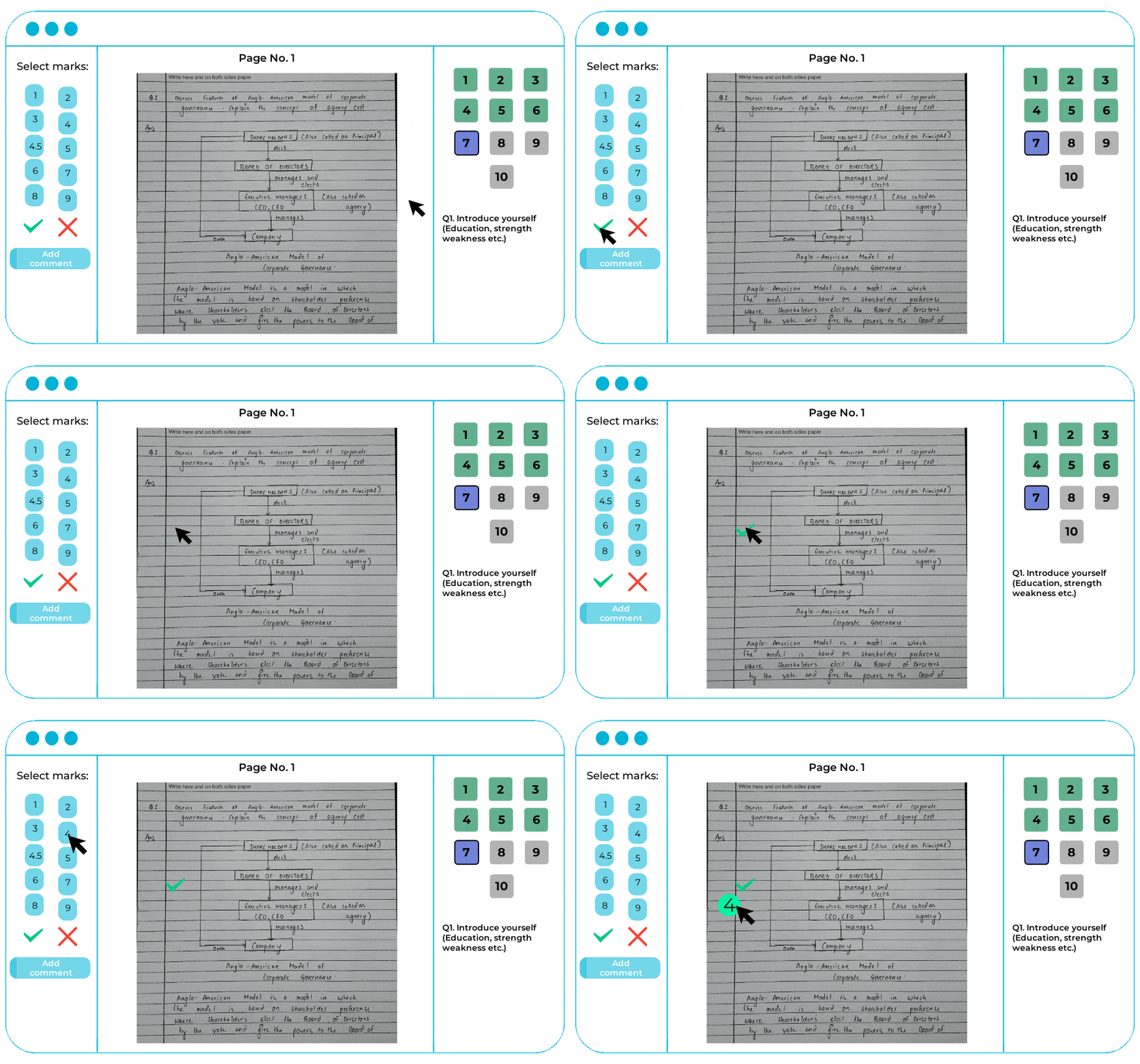
Answer Sheet Evaluation
-
Instant Results & Marksheets: Scores are auto-calculated and marksheets are generated in seconds.
-
One-Click Export: Download to Excel and upload to any results portal, eliminating manual scoring.
Re-Evaluation of Answer Sheet
- No more photocopies, no more logistics among the students and institutions.
- Onscreen evaluation speeds up rechecks with swift, error-free accuracy.
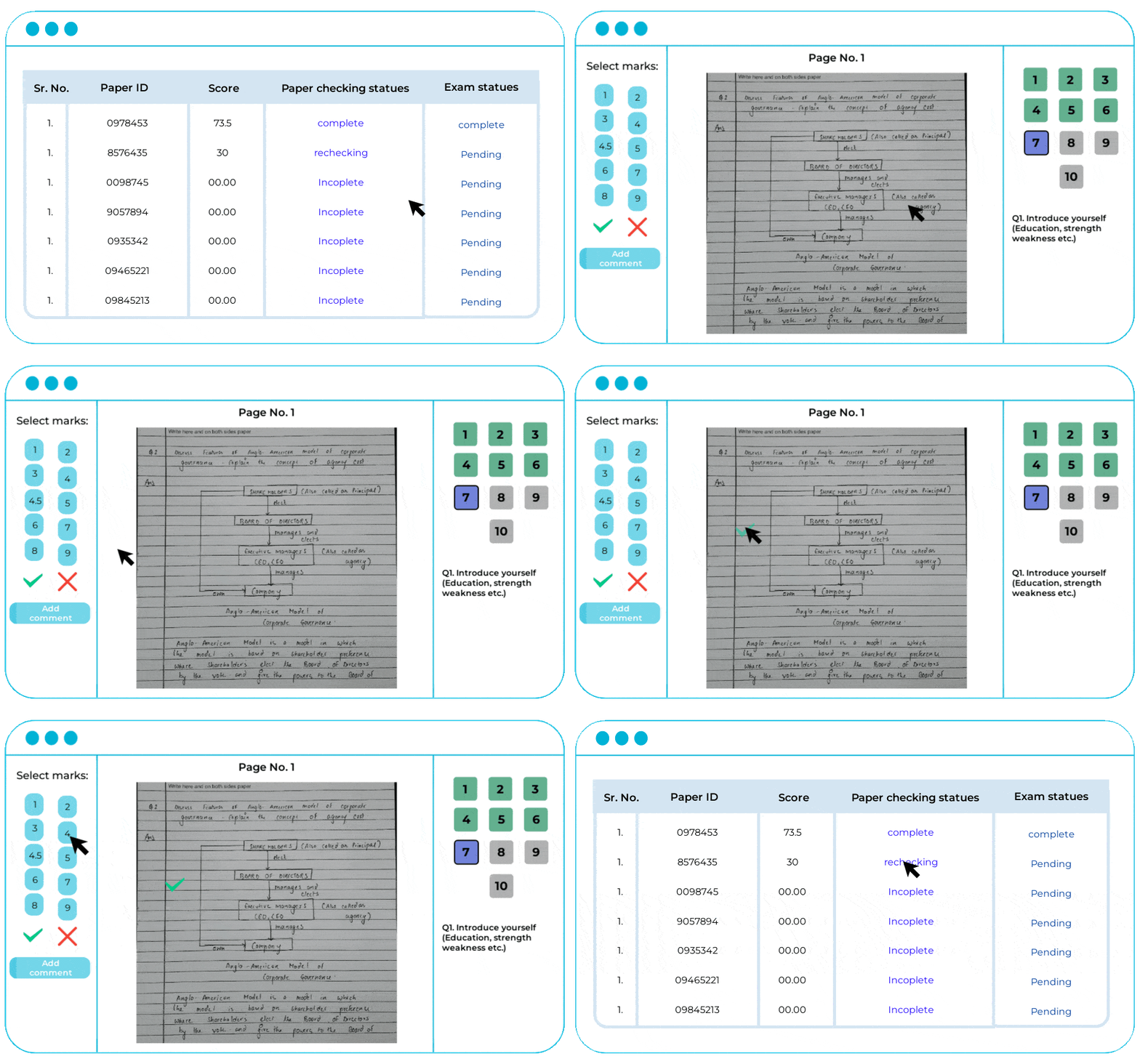
Real-World Success Story
Sharda University Onscreen Evaluation Case Study
Sharda University, a multidisciplinary institution with 200 + courses and 25 000 + students, used to rely on fully manual answer-sheet evaluation. Travel for examiners, physical movement of scripts and long result timelines slowed the academic calendar.
After adopting Eklavvya’s Onscreen Evaluation system, the university digitised the checking of more than 100 000 answer sheets, eliminating paper handling and enabling moderators and examiners to work from anywhere while maintaining exceptional precision.
Explore How?90%
Efficiency Increase
75%
Result Time Reduction
80%
Cut Travel & Logistics
95%
Marking Accuracy
Advanced Anti-Cheating System
Identity Verification
AI-based face recognition to verify candidate identity
Multi-Face Detection
Detects unauthorized persons in the video frame
Device Detection
Identifies phones, tablets, and other electronic devices
Anti-LLM Prevention
Blocks ChatGPT/Gemini usage via typing detection
Typing Analysis
Detects suspicious typing patterns and speeds
Copy-Paste Lock
Strict blocking of clipboard paste functions
Window Lock
Detects tab/window switching with alerts
Verbal Response Mode
Force voice-only answers for authenticity
Regional & International Language Excellence
Discover Effortless Answer Sheet Evaluation

Answer Sheet Checking with Onscreen Evaluation

7 Tips for Choosing the Right Onscreen Marking Software

6 Proven Ways for Accurate Answer Sheet Checking
Certificates
Security and Compliance without Compromise

CERT-IN Certified for
Software Security

ISO/IEC 27001:2013 certified for
Information Security System
Highly Rated by Users on Top Review Platforms


Shri Ketan Naik
Goa College of Engineering
Examiner image capturing for identity verification and digital evaluation has significantly improved speed and accuracy as compared to manual methods.


Mr. T J Ravishankar
J N Tata Endowment For the Higher Education of Indians (Tata Trust)
We appreciate all efforts taken by the entire team of Eklavvya to successfully complete the examination without any glitch.


Prof Mahanwar
Mumbai University(Director)
Examinations with an evaluation of more than 500,000 students were conducted by the Eklavvya platform with accuracy.


Mr. Ashish Apte
Controller of Examination (NMIMS University)
Very happy with Eklavvya – great customization, user-friendly, and cost-effective. They were deployed quickly and the team is always positive and ready to help. Switched to Eklavvya for better technology and processes. Highly recommend!


Prof. Shubhashish Goswami
Controller Of Examination (DEV BHOOMI Uttarakhand University)
We used to have a hard time making the answer sheet checking process smooth. But with Ekalavvya’s onscreen marking system, things got a lot easier. Examiners and moderators now have a simpler time.


Mr. Shantilal T. Ghalme
Controller Of Examination
Indira College of Commerce and Science
Eklavvya’s exceptional solution ensured that all milestones of the examination answer sheet evaluation project were met efficiently.
Eklavvya team has clear and consistent communication, superior technology platform
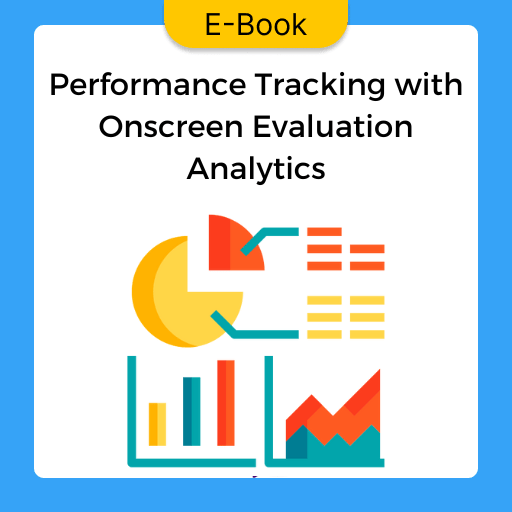
Keeping tabs on Performance using Analytics from Onscreen Evaluations.
Talk to our team
Planning an onscreen evaluation rollout?
Tell us your scale and timelines and we will show you how scanning, allocation, evaluation and result publishing fit into one cycle.
- A specialist replies, not a bot
- No obligation and no cost to scope it
- Usually within one working day
Frequently Asked Questions
What is an onscreen evaluation system?
An online evaluation system is a software in which examiners can accurately check students’ answer sheets in less time. The software evaluates answers, shows the right marks, and calculates total marks. By using this method, educational institutes can publish results in less time.
How do you evaluate answer sheets online?
It would help if you scanned answer sheets in the online evaluation software. After scanning, the software will automatically collect all data and secure them. Then the system will evaluate each paper while you can see that on screen. After evaluation, the system will calculate the total marks and save all the data. After login in, you can get any data from any answer sheet from the software.
What are the benefits of onscreen evaluation?
The examiner saves time, energy, and money in the onscreen evaluation process. As the examiner can check papers from anywhere at his convenience, he can save more time and produce the result in less time to the authority. And if any student wants to recheck, that also takes minimum time.
The software secures every piece of data in its system, so there is no chance of losing answer sheets or damaging sheets. Apart from that, it also gives the student a fair evaluation of their exams.
What are some common mistakes people make while using onscreen evaluation software?
Although the onscreen evaluation software does the whole evaluating and marking process automatically, there are some things you need to be careful about while using it. First, do not go into the pilot phase while evaluating answer scripts. While the system is checking, keep following and put changes where you think necessary.
Many institutes use the software to release results earlier but do not guide examiners about using the software. It would be crucial to give important guidelines about the software to checkers, moderators, and examiners to use it correctly.
Have a Look.