
Introduction
An examination coordinator finds herself surrounded by stacks of answer sheets. The semester exams ended weeks ago, yet dozens of teachers are still racing against time to grade thousands of papers by hand.
In one corner of the staff room, two senior examiners huddle with calculators, double-checking totals on score sheets. In another, a moderator frantically flips through a random sample of papers to spot any scoring inconsistencies.
Sound familiar? This scene plays out every exam season at institutions that rely on traditional paper-based evaluation, where human errors and logistical hurdles often overshadow academic achievement.
A major national board exam in India found that nearly 50% of the answer sheets that underwent re-evaluation had marking mistakes, such as questions scored zero despite correct answers.
Even with safeguards, officials reported an error rate of about 0.4% in manual grading – which, across ~6 million exam papers, meant tens of thousands of students initially received incorrect marks.
Such mistakes include missed answers and calculation errors, leading to significant rechecking and regrading efforts. Moreover, the administrative burden of shuffling papers between exam centers, evaluators, moderators and result compilers causes inevitable delays.
Unsurprisingly, result declarations often get postponed due to these labor-intensive processes. The traditional system’s challenges from logistical costs to lack of transparency highlight a pressing need for a better solution in academic assessments.
What is an Onscreen Marking System?
An onscreen marking system is a platform that enables evaluators to grade scanned copies of answer sheets on a computer screen instead of on paper. Simply put, it turns physical exam copies into secure digital documents that teachers can mark online.
A physical written answer sheet is first scanned and uploaded to a cloud-based system. The system then provides digital tools for examiners to annotate answers, assign scores, and even have totals calculated automatically.
Moderation and re-checking can also be done within the same platform without handling any physical sheets. Teachers no longer need to travel to a central location or sift through bundles of booklets; they can securely log in from anywhere to evaluate the answer scripts.
The software ensures the student’s identity is masked (often using barcodes or QR codes on each script) so that marking remains unbiased.
All entries are saved digitally, eliminating manual data entry of marks into result systems. An onscreen marking system brings the entire evaluation workflow into a centralized, paperless, and transparent environment, improving speed and accuracy while cutting down on errors.
How Onscreen Evaluation Works: From Scanning to Results
Implementing a digital paper evaluation workflow involves a series of streamlined steps that mirror the traditional process but with improvements at each stage:

1. Scanning of Answer Sheets
After students complete their exams on paper, the answer booklets are collected and digitized using digital scanners. Each sheet is scanned at high resolution to ensure clarity and then securely uploaded to the evaluation software.
During this process, the system can automatically mask student information (such as names and roll numbers) to guarantee an unbiased evaluation. What used to be a tedious manual step covering names with paper slips is now handled via barcodes or QR codes mapped to each student.
2. First-Level Marking by Examiners
After scanning, the answer sheets are virtually assigned to examiners through the software.
Each examiner can securely log in to the onscreen marking system from any location (home, office, or anywhere with internet) to evaluate their assigned answers. There is no geographical constraint; a teacher in one city can mark papers for a college in another, which greatly eases faculty scheduling.
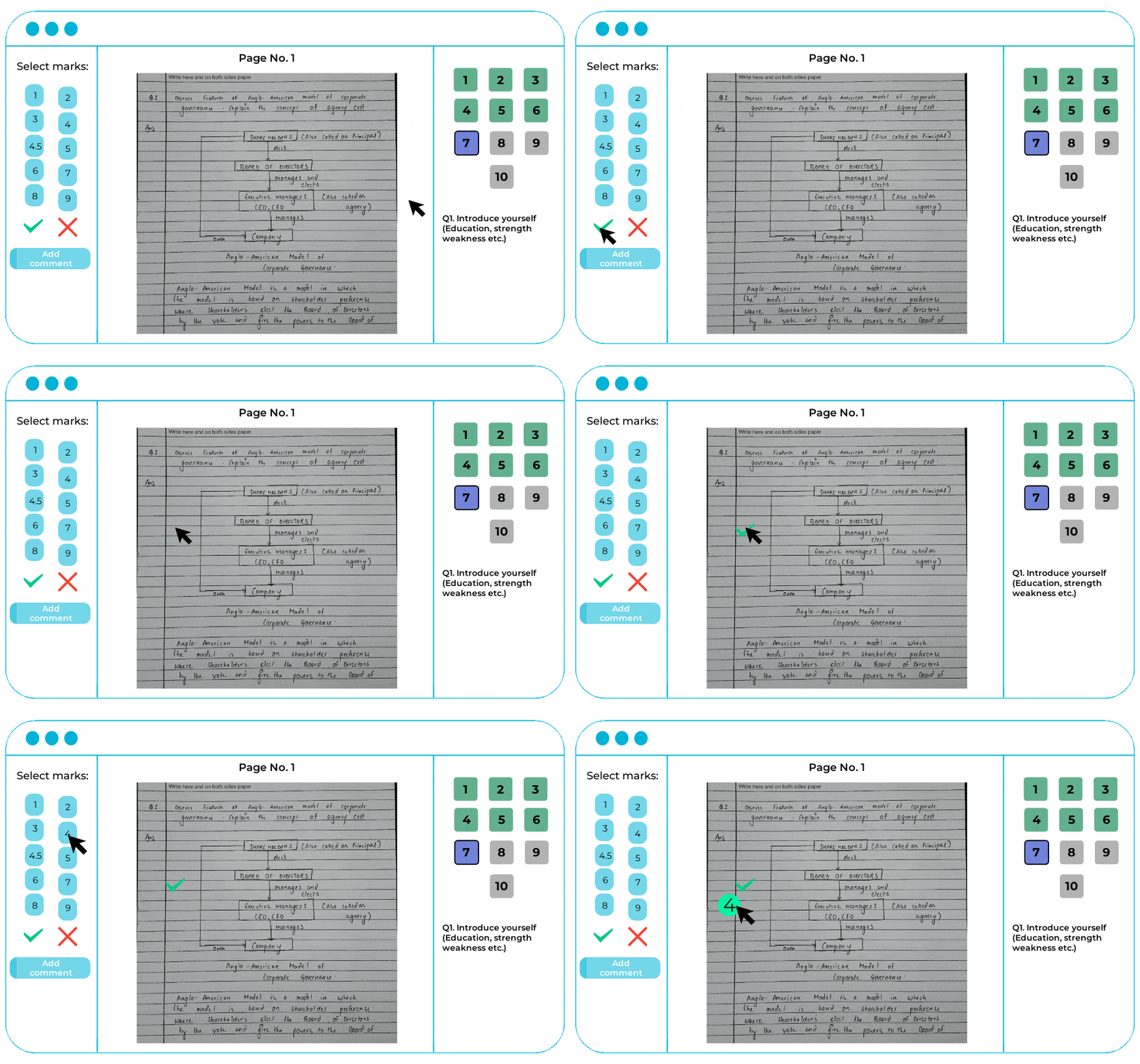
The examiner sees the scanned answers and can annotate, comment, and assign marks question by question using digital tools (annotations, highlighters, comment boxes, etc.).
The system ensures no response is overlooked; for example, it may prompt the evaluator to tag any blank pages or unanswered questions to prevent accidentally skipping them.
As the examiner scores each answer, the software auto-calculates the total, removing any chance of arithmetic errors in summing up marks.
In cases where students have to answer any 3 of 5 questions, the system can even be configured to automatically consider the student’s best attempts assigning marks for the top 3 answers and ignoring the lowest-scoring ones, according to the pre-set marking scheme.
This smart feature means the teacher doesn’t need to manually decide which optional answers to count; the onscreen evaluation software does it accurately and consistently.

3. Second-Level Review
After the first level of evaluation, the system streamlines the crucial process of moderation. Traditionally, moderation involves randomly pulling a subset of papers for rechecking by a senior examiner.
In an onscreen marking system, moderation is far more targeted and efficient. The software can apply rule-based criteria to automatically flag which answer sheets need a second look.
Administrators might configure the system to auto-select 100% of failed papers (scores below 30%) for moderation and say 50% of top-scoring papers (90+%) for a quality audit.
Moderators can then log in from anywhere (just like examiners) and are given fresh access to those flagged sheets. Crucially, the moderator does not see the first examiner’s marks or comments. The system can hide the initial scores to ensure an independent review.
The moderator re-evaluates the answers digitally and any discrepancies in marking can be noted and resolved. The final score for a student can be calculated based on a predetermined formula that considers both the examiner’s and moderator’s evaluations.
For instance, if a moderator significantly revises a score, the software can either take the moderator’s score as final or average the two scores, depending on the institute’s rules. All of this happens without moving a single paper physically.
As a result, moderation no longer requires transporting answer sheets to senior faculty, it’s all done in the cloud with every action tracked.
- Eliminate manual answersheet checking.
- Check answersheets from any location.
- Automate result processing using technology.
Further readings:
- Top 5 Onscreen Marking Tools for 2026
- 7 Tips for Choosing the Right Onscreen Marking Software in 2026
4. Automatic Result Generation
With all answer sheets evaluated the system moves into result processing. This is where the onscreen marking system truly shines in efficiency. The moment the grading is finalized, the software can calculate total marks and compile results for thousands of students literally at the click of a button.
The result generation module can instantly prepare student-wise scores, grade sheets, and even performance analytics. This not only reduces the result processing time but also eliminates calculation errors that often happen when moving data from paper to Excel.
Many systems allow exporting the results in formats like Excel or directly integrating with the institute’s result database, making publication of results a seamless next step.
- Eliminate manual answersheet checking.
- Reduce evaluation time of answer sheets.
- Auto-calculation of total marks
5. Student Access and Recheck Requests
In a paper-based setting, if a student wants to see their evaluated answer sheet or apply for rechecking, it’s a laborious process – filling forms, paying fees, waiting for someone to photocopy or retrieve the physical script, and so on.
With onscreen marking, providing post-exam feedback and support becomes much easier. The system can allow controlled student access to their own scanned answer sheets once the results are out.
An institute can permit students to log into a portal (or send them a secure PDF) to view their evaluated answer sheet online for a week or two after the results.
This way, students can see exactly where they scored or lost marks, along with any comments from examiners, which greatly improves trust in the evaluation’s fairness. If a student still has a grievance and requests a recheck/re-evaluation, that too is streamlined.
The admin can simply assign the digital script to a moderator or a different examiner on the system – no paper shuffling or mailing required. The moderator can then re-mark it digitally, and because the entire history is logged, it’s clear what changes were made upon recheck.
The onscreen evaluation process makes re-evaluation easy and accurate to complete the revaluation in less time with no need for photocopying physical sheets or managing any to-and-fro logistics between students and the university. Students get their concerns addressed faster, and administrators deal with far less chaos.
The entire workflow, from the moment an answer sheet is written to the moment results and rechecks are finalized, becomes a digital process. And it’s one that many forward-thinking institutions have already implemented successfully.
The Tata Institute of Social Sciences (TISS) noted that after adopting an onscreen marking system, they can now evaluate over 1,00,000 answer sheets each session, drastically speeding up result processing.
Similarly, the leading govt authority uses onscreen evaluation to manage lakhs of exam papers per session across centers nationwide. These real-world cases underscore that digital evaluation isn’t just a theoretical ideal but a proven practice at scale.
Smart Features Powering Digital Evaluation

Onscreen marking platforms come packed with smart features that enhance efficiency, accuracy, and transparency in the evaluation process. Here are some of the key features and how they benefit academic assessments:
Anywhere, Anytime Access
Because answer scripts are digitized and stored securely online, evaluators and moderators can access them from any location at any time. This remote accessibility means a professor can grade papers from home or a different campus without delays.
Removing the location constraint not only speeds up grading but also cuts down travel and logistics costs for institutions. It enables colleges to engage external examiners or faculty in evaluation work without needing them on-site, thus tapping into a larger pool of expertise.
Automated Score Calculation
Onscreen marking systems automatically calculate subtotals and totals as examiners input marks. This auto-totalling guarantees error-free calculation.
Moreover, the software can enforce rules like compulsory questions and optional questions. If a student answers extra optional questions, the system can be configured to choose the best scores among them and ignore the rest.
Such automatic score processing not only saves evaluators time but also ensures consistency and fairness according to the exam rules. In objective sections (like multiple-choice questions), the system can even auto-grade instantly, further accelerating the evaluation.
- Eliminate manual answersheet checking.
- Reduce evaluation time of answer sheets.
- Auto-calculation of total marks
Detailed Audit Logs and Analytics
The system maintains audit logs of every action which users logged in, when they accessed a script, how long they took to grade it, any changes made to marks, etc. These logs provide full accountability and make it easy to audit the evaluation process. If a student raises a grievance, administrators can see exactly how that paper was handled, when, and by whom.
Additionally, real-time dashboards offer analytics such as how many papers each examiner has completed, average time per paper, and moderation progress.
This level of monitoring was impossible with manual methods. The data can also feed into reports on question-wise performance, course-wise result analysis, and other insights that help improve teaching and exam design.

Role-Based Security and Privacy
Onscreen marking systems typically use robust, role-based access controls to ensure security and confidentiality at every stage. Different user roles like scanner, examiner, moderator, administrator and student are granted access only to the functions and data they need.
For instance, a moderator can only see scripts that have already been evaluated by an examiner, and often they see them with the initial marks concealed to avoid bias. Students, on the other hand, might get read-only access to their own evaluated papers for a limited time and nothing more.
These controls, combined with encryption and secure cloud storage, protect sensitive exam data. All of this means the digital system is secure by design, reducing risks of paper leaks, tampering, or biased grading.
The combination of these features leads to a more efficient, accurate, and transparent assessment process. As one educational institute observed, digital answer sheet evaluation systems are “more efficient, faster, accurate, and traceable” than the old pen-and-paper method.
They minimize human error and bias by leveraging automation and structured workflows. All stakeholders from teachers and moderators to students and administrators benefit from the streamlined operations and clarity that onscreen marking provides.
- Eliminate manual answersheet checking.
- Check answersheets from any location.
- Automate result processing using technology.
Explore Case Studies
- Successful Implementation of Eklavvya Onscreen Marking System at a Leading Public Service Commission
- Unveiling the Secret to Effortless Answer Sheet Checking at a Major University!
- Transforming Central Govt. Exams Evaluation With Onscreen Marking
Conclusion
Onscreen marking systems offer a path from chaos to clarity in the world of exam evaluations. By digitizing answer sheet evaluation and moderation, educational institutions can dramatically improve their assessment workflows.
The advantages are significant time savings in result processing, higher accuracy with automatic calculations and enforced checks, and greater transparency for all stakeholders.
Educators spend less time on tedious tasks and more on actual evaluation and feedback. Administrators gain control and insight into the process through dashboards and logs. Students receive quicker results and have more trust that their papers are evaluated consistently and fairly.
Moreover, adopting a digital answer sheet evaluation system future-proofs an institution’s examination process. It becomes easier to handle growing student numbers without proportional increases in evaluation workload scaling up is as simple as adding more evaluators to the system, not finding more physical space or shipping more paper parcels.
It also opens the door to integrating assessment data with other academic systems (like directly porting scores into the student information system, or analyzing performance trends across semesters).
In an era where education is blending physical and digital modes, having the evaluation process online brings academics one step closer to a truly modern, smart campus.
It’s important to pilot new systems, train faculty, and refine the process to fit an institution’s specific needs. The initial investment in scanners, software, and training quickly pays off in the form of saved weeks in the academic calendar and improved credibility of the examination system.
By embracing an onscreen marking system, institutions can ensure that the critical task of grading which impacts students’ futures is executed with the highest standards of efficiency, accuracy, and transparency.
In the end, it means a smoother experience for teachers, fairer outcomes for students, and a robust, audit-proof evaluation process for the institution. That’s a win-win scenario that deserves to be the new standard in academic assessments.