
Introduction
Answer sheet checking decides every student’s future, yet manual evaluation is still riddled with errors. In CBSE’s 2026 Class 12 results, roughly 1 in 4 students applied to view their scripts, RTI re-evaluations surfaced gaps of 12 to 40 marks, and the pass rate fell to 85.2% from 88.39% the year before.
Many students reported portions of their answers had gone unassessed or that digital copies were too unclear to read.
The good news: most marking errors are preventable. Institutions that moved to onscreen marking in 2025 report about 68% fewer evaluation errors, and AI-assisted grading now agrees with human examiners around 95% of the time. Below are 8 proven ways to make answer sheet checking faster, fairer and far more accurate.
Why Traditional Paper Checking Goes Wrong
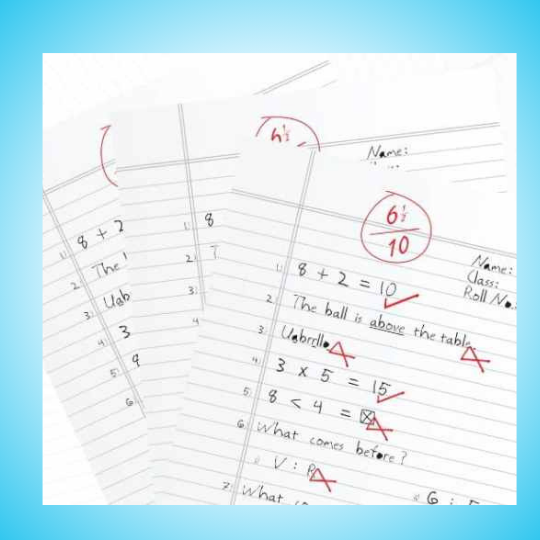
Before fixing accuracy, it helps to know where errors creep in. Seven failure points account for most marking disputes:
The Cost of These Mistakes
| Problem | Impact on Students | Impact on Institution |
|---|---|---|
| Wrong marks given | Unfair results, failed students who should pass | Loss of trust, legal issues |
| Missed pages | Zero marks for written answers | Re-evaluation requests, extra work |
| Calculation errors | Wrong total scores | Reputation damage |
| Slow checking | Delayed results, admission problems | Student complaints, administrative burden |
| Lost papers | No way to prove their work | Major crisis, possible lawsuits |
Want the wider picture first? See our deeper breakdown of answer sheet evaluation challenges and solutions.
The good news? Almost all these problems can be solved. Modern digital tools make answer sheet checking faster, more accurate, and easier for everyone. Let’s see how.
8 Ways to Improve Answer Sheet Checking Accuracy
1. Use Onscreen Evaluation Systems
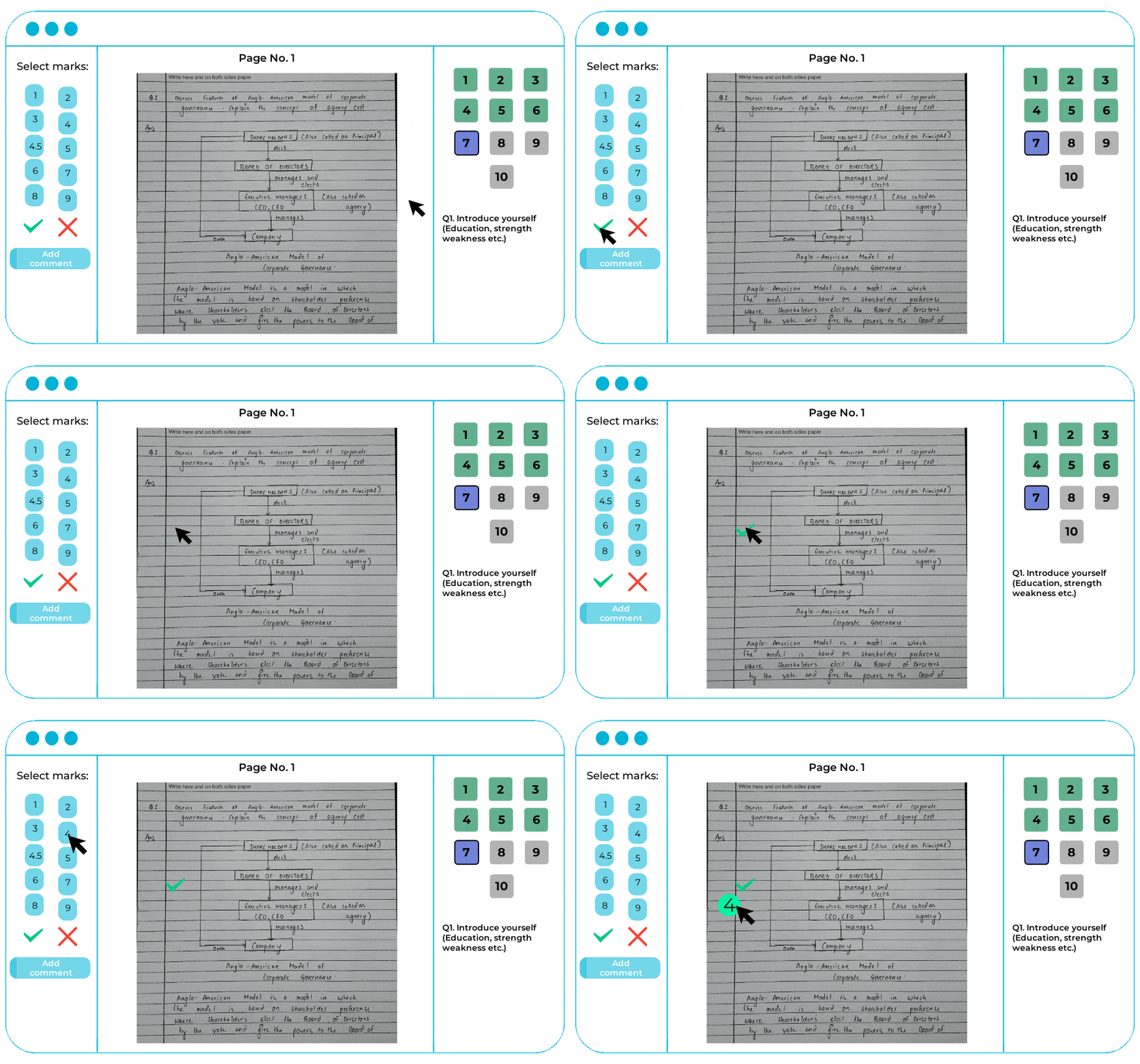
Onscreen evaluation is the single biggest improvement you can make. Instead of checking physical papers, teachers check scanned answer sheets on their computer screens.
How It Works:

Why This Method is Better
Check From Anywhere
Teachers don’t need to come to a central location. They can check answer sheets from home, during their free time. This is especially helpful for teachers in different cities or during situations like pandemics.
No Papers Get Lost
Digital copies are stored safely on secure servers. Even if the original paper is damaged, the scan is safe. You can access any answer sheet anytime, even years later.
Better Quality Control
Administrators can see how checking is progressing in real-time. They can check if teachers are spending enough time on each sheet. If someone is rushing, they can intervene before results are finalized.

Easy Re-evaluation
When students request re-checking, you don’t need to find the physical paper. The digital copy is available instantly. A second teacher can check it quickly.
Eklavvya’s platform has evaluated more than 500,000 answer sheets with high accuracy. Institutions can handle large exam volumes without adding more physical infrastructure.
Real Results from Institutions
A large university in India switched to onscreen evaluation. Here’s what happened:
- Results came out 10 days earlier than usual
- Re-evaluation requests dropped by 60% because of fewer errors
- Teachers could check papers from home, reducing stress
- Storage costs for physical papers were eliminated
- Student satisfaction with the evaluation process improved significantly
Compare your options in our guide to onscreen marking software for 2026.
- Eliminate manual answersheet checking.
- Check answersheets from any location.
- Automate result processing using technology.
2. Monitor How Much Time Each Evaluator Takes
Time spent on checking tells you a lot about quality. If a teacher checks 100 answer sheets in just 3 hours, something is wrong. They’re probably rushing and missing things.
Why This Matters
Good evaluation takes time. To properly read an answer, understand what the student wrote, compare it with the marking scheme, and assign fair marks needs at least 2-3 minutes per answer. For a 10-question paper, that’s 20-30 minutes per sheet minimum.
When teachers finish too quickly, errors increase. They might:
- Skip reading full answers and just look for keywords
- Give marks based on answer length instead of content quality
- Miss important points students made
- Not follow the marking scheme properly

How to Track Evaluation Time
With Digital Systems
Onscreen evaluation platforms automatically track how long each teacher spends on each answer sheet. Administrators can see:
- Average time per answer sheet for each evaluator
- Which teachers are checking faster or slower than others
- If time spent matches the complexity of answers
- Patterns that might show rushing or excessive delay
Without Digital Systems
If you’re still using paper, track this manually:
- Note what time you give papers to each teacher
- Note what time they return completed bundles
- Calculate time per sheet based on bundle size
- Compare across different evaluators
What to Do with This Information
Important: If someone is checking much faster than normal, talk to them. They might have misunderstood instructions. Provide guidance on proper evaluation time. Consider re-checking some of their papers to ensure quality.
On the other hand, if someone is taking very long, they might need help understanding the marking scheme better. Provide training so they can work more efficiently without sacrificing quality.

3. Make Sure All Pages Are Checked
This sounds obvious, but it’s one of the most common mistakes. Students sometimes leave pages blank during the exam, then go back and write on them. When teachers flip through the booklet, they might miss these pages with answers on them.
Why Pages Get Missed
Blank Page Confusion
Students often write on one side of a page, leaving the back blank. When flipping pages quickly, teachers might think a blank page means the booklet has ended.
Out of Order Answers
Some students don’t write answers in question number order. They might write Question 5 before Question 3. If teachers expect answers in order, they might miss the out-of-sequence ones.
Additional Sheets
Students sometimes ask for extra sheets. These get attached to the main booklet. In the rush of checking, these extra sheets can be overlooked.
How Digital Systems Solve This
Onscreen evaluation systems have a smart feature: they won’t let teachers submit the evaluation until they’ve visited every single page. The system tracks which pages have been viewed.
If a teacher tries to submit marks without opening a page, the system shows a warning: “Page 7 has not been checked. Please review before submitting.”
This simple feature has prevented countless errors where students lost marks for answers they actually wrote.
For Paper-Based Checking
If you’re still checking physical papers, follow this process:
- Count the total pages in the booklet before you start checking
- Write page numbers in the corner if they’re not already there
- Put a small checkmark on each page as you review it
- After finishing, flip through the entire booklet again to confirm all pages have checkmarks
- Pay special attention to additional sheets that might be loosely attached
Tip for Students: Always write page numbers clearly. If you use additional sheets, write your roll number on each sheet and indicate which question you’re answering. This helps teachers find all your answers.
4. Simplify the Moderation Process
Moderation is when a senior teacher reviews the checking done by junior teachers. This is important for quality control, but if the process is too complicated, it creates problems instead of solving them.
Problems with Complex Moderation
Some institutions have very complex moderation processes:
- First evaluator checks all questions
- The second evaluator checks the selected questions
- Moderator reviews both evaluations
- If marks differ by more than X%, a third person checks
- All three people need to agree before the marks are final
This sounds thorough, but it causes problems:
- Takes much longer to complete the evaluation
- Needs many more teachers, which is expensive
- Different evaluators might have different standards
- Students get frustrated waiting for result
Random Sample Checking
Instead of double-checking everything, check a random sample:
- Each evaluator checks the assigned answer sheets
- The moderator randomly selects 10% of each evaluator’s work
- If the quality is good in the sample, approve all their work
- If problems are found, check more papers from that evaluator
Automated Red Flags
Digital systems can automatically flag unusual patterns:
- If one evaluator’s average marks are much higher or lower than those of others
- If checking time is suspiciously fast
- If the same mark is given to many different answers
- If marks don’t follow a normal distribution pattern
When the system raises a flag, only then does a moderator manually review those specific papers.
Benefits of Simple Moderation
| Aspect | Complex Moderation | Simple Moderation |
|---|---|---|
| Time to Results | 4-6 weeks | 1-2 weeks |
| Teachers Needed | 3x more staff | Normal staff + 1 moderator |
| Cost | Very high | Reasonable |
| Error Detection | Catches most errors, but slow | Catches most errors through sampling |
| Teacher Satisfaction | Low (feel mistrusted) | High (trusted but verified) |
5. Use Performance Data to Track Quality
Data helps you see patterns that human eyes miss. When you have data from thousands of answer sheets, you can spot problems quickly and fix them.
What Data Should You Track?
Evaluator Performance Data
- Average marks given by each evaluator
- Time spent per answer sheet
- Consistency in marking (do they give similar marks to similar answers?)
- How their marks compare to those of other evaluators checking the same subject
Student Performance Data
- Which questions did students find most difficult
- Common mistakes across many students
- Subject-wise performance patterns
- Comparison with previous exam results
Process Quality Data
- How many re-evaluation requests you receive
- When re-checked, how often do marks change significantly?
- Time taken from exam day to result declaration
- Number of complaints about evaluation quality
How to Use This Data
Identify Outliers
If one evaluator’s average marks are 65% while others checking the same paper average 55%, something is off. Either they’re too lenient, or others are too strict. Review some of their checked papers to understand why.
Improve Teaching
If 80% of students got a particular question wrong, it means teaching of that topic needs improvement. Use this feedback to adjust your curriculum and teaching methods for next year.
Provide Targeted Training
If data shows one evaluator is inconsistent, provide them with specific training. Show them examples of how marking should be done.
Digital platforms automatically generate performance reports. You get visual charts and graphs showing all this data. No need for manual calculation or complicated spreadsheets.
6. Let AI Assist With Answersheet Evaluation
This is the biggest advancement in answer sheet checking. AI reaches ~95% agreement with human graders overall, and 85-90% on medium-length (200-500 word) descriptive answers, while cutting ~31% time per response and ~33% per sheet.
How AI Grading Works
Step 1: Scanning and Text Recognition
Answer sheets are scanned and uploaded. AI uses OCR (Optical Character Recognition) to convert handwritten text into digital text. Modern AI can read different handwriting styles accurately.
Step 2: Teacher Trains the AI
The teacher checks about 20-25% of answer sheets manually. As they give marks, the AI watches and learns. It understands:
- What kind of answers get full marks
- What mistakes lead to mark deduction
- How the teacher applies the marking scheme
- What keywords and concepts are important
Step 3: AI Checks Remaining Answers
Once the AI learns the pattern, it automatically evaluates the remaining 75-80% of answers. It applies the same standards the teacher used in their manual checking.
Step 4: Teacher Reviews AI’s Work
The teacher reviews a sample of AI-graded papers to ensure accuracy. If they spot issues, they can adjust the AI’s understanding and it re-grades accordingly.
AI can achieve up to 98% accuracy in grading descriptive answers while reducing evaluation time by 31% per response. One institute saved 2,000+ hours of teacher time using AI grading.
What Makes AI Answer Sheet Checking Better Than Manual Checking
Never Gets Tired
AI doesn’t get tired after checking 100 papers. The 1000th paper gets the same attention and accuracy as the first one. Humans naturally lose concentration over time.
No Handwriting Bias
AI reads the content, not the handwriting quality. A student with messy handwriting but correct answers gets the same marks as someone with neat handwriting. This is more fair.
Perfectly Consistent
AI applies exactly the same standards to every answer. It doesn’t have good days and bad days. It doesn’t give slightly higher marks in the morning and lower marks after lunch.
Detailed Feedback
AI doesn’t just give a number. It can explain why marks were given or deducted. It might say: “Full marks for explaining the concept. 2 marks deducted for missing the example. 1 mark deducted for calculation error.”
This detailed feedback helps students understand their mistakes and improve. Teachers rarely have time to write such detailed comments on every answer.
Common Concerns About AI Grading
“Will AI replace teachers?”
No. Teachers train the AI and review its work. AI is a tool that saves teachers time on repetitive work, so they can focus on actual teaching. Think of it like how calculators didn’t replace math teachers – they just made calculations faster.
“Can AI understand creative answers?”
Modern AI can understand different ways of explaining the same concept. If a student phrases something differently but the meaning is correct, AI recognizes it. For subjects requiring highly subjective judgment (like creative writing), human teachers still do the evaluation.
“What if AI makes mistakes?”
That’s why teacher review is built into the process. AI’s work is monitored. If accuracy drops below acceptable levels, the system alerts administrators and more manual checking is done.
Real-World Results
One of India’s largest training institutes implemented AI grading:
- Successfully evaluated over 5,000 descriptive responses during online exams
- Saved more than 2,000 hours of teacher evaluation time
- Students received results within 24 hours instead of 2 weeks
- Re-evaluation requests dropped by 70% due to higher accuracy
- Teachers could spend more time on lesson planning and student mentoring
- Eliminate manual errors with AI-powered grading
- Let AI evaluate answer sheets anytime, anywhere.
- Bias-free marking with detailed student feedback
7. Train Your Evaluators
Even experienced teachers benefit from evaluation training. Many teachers have never been trained specifically on how to evaluate answer sheets. They just do it the way it was done to them as students.
What Training Should Cover
Understanding the Marking Scheme
Not all teachers interpret marking schemes the same way. Training sessions should:
- Go through each question and its marking scheme in detail
- Show examples of answers that deserve full marks, half marks, and no marks
- Discuss how to handle partially correct answers
- Clarify how to award marks for method, even if the final answer is wrong
Common Mistakes to Avoid
Share real examples of evaluation mistakes from past years:
- Missing pages with answers
- Adding marks incorrectly
- Being too strict or too lenient compared to the standard
- Letting handwriting quality influence marks
- Rushing through evaluation to finish quickly
Using Digital Tools
If you’re using onscreen evaluation or AI systems, teachers need training on:
- How to log in and navigate the platform
- How to use digital marking tools (add marks, comments, highlights)
- How to submit completed evaluations
- What to do if they encounter technical issues
- Understanding the performance reports the system generates
When to Provide Training
Before Each Evaluation Cycle
Don’t assume teachers remember everything from last year. A quick refresher session before each exam season helps everyone stay aligned.
For New Evaluators
Teachers evaluating for the first time need thorough training. Consider pairing them with experienced evaluators for the first few papers as a mentorship approach.
Based on Performance Data
If your performance tracking shows an evaluator is inconsistent or too far from the average, provide individual coaching to help them improve.
8. Set Up Quality Control Checks
Even with all the above methods, you need a final safety net. Quality control checks catch any problems before results go out to students.
Random Sample Verification
After all evaluation is complete, a senior moderator randomly selects 5-10% of papers and re-checks them completely. They don’t know who the original evaluator was, so there’s no bias.
If the moderator’s marks match the original marks (within acceptable variation of 2-3 marks), the evaluation is approved. If there are significant differences, more papers from that batch are checked.
Automated Error Detection
Digital systems can catch errors automatically:
Mark Calculation Checks
- Verify that the total marks don’t exceed the maximum possible marks
- Check that all question marks add up to the total shown
- Flag any negative marks (which shouldn’t exist)
- Ensure no marks are given to blank answers
Statistical Anomaly Detection
- Identify answer sheets where all questions got the same marks (suspicious pattern)
- Flag papers where the mark distribution is very unusual
- Detect if an evaluator suddenly changed their marking pattern midway
Double-Blind Checking for High-Stakes Exams
For very important exams, use double-blind checking for a sample of papers:
- Two evaluators independently check the same papers
- Neither knows the other is also checking those papers
- Neither knows the student’s identity (roll numbers are hidden)
- A moderator compares both evaluations
- If marks differ significantly, a third senior evaluator checks
This is expensive and time-consuming, so it’s only used for very important exams or random samples. But it provides the highest level of quality assurance.
Student Feedback Loop
After results are declared, students should have an easy way to:
- View their evaluated answer sheets (scanned copies)
- Understand how marks were awarded for each answer
- Request re-evaluation if they believe there’s an error
Most re-evaluation requests will find no errors if your process is good. But even catching 1-2 genuine mistakes per 1000 papers is important. Those students deserve fairness.
Digital systems make this easy. Students can log in, see their answer sheet with marks clearly shown on each answer, and request re-checking with just a few clicks.
Further Readings: 15 Answer Sheet Checking Tips: Save 70% Time with AI & Digital Evaluation
Manual vs Onscreen + AI Evaluation
| Factor | Manual paper checking | Onscreen + AI evaluation |
|---|---|---|
| Time per paper | 15-20 min | 8-10 min |
| Marking errors | High (fatigue, totalling) | ~68% fewer |
| Missed pages | Common | Blocked before submit |
| Audit trail | None | Complete, per evaluator |
| Re-evaluation | Slow, contested | Fast, transparent |
| Descriptive grading | Fully manual | AI-assisted, ~95% human agreement |
How to Start Using These Methods
You don’t need to implement everything at once. Start small and gradually improve your process. Here’s a practical roadmap:
Phase 1: Immediate Improvements (This Week)
These cost nothing and can be implemented immediately:
- Create a pre-evaluation checklist for teachers listing common mistakes to avoid
- Emphasize checking all pages – make it the first item in your checklist
- Track evaluation time – even manually, just note start and end times
- Conduct a brief training session before evaluation begins
Phase 2: Move to Digital (Next Month)
Start using onscreen evaluation for your next exam cycle:
- Choose a platform – Eklavvya offers free trials, so you can test before committing
- Train 2-3 teachers first as a pilot group
- Use it for one subject to start, not all subjects at once
- Collect feedback from teachers and students
- Expand gradually to more subjects and evaluators
Phase 3: Add AI Automation (Within 3 Months)
Once onscreen evaluation is working smoothly:
- Start with high-volume subjects where AI will save the most time
- Choose questions suitable for AI – fact-based answers work best initially
- Monitor accuracy closely in the first cycle
- Collect teacher feedback on AI performance
- Expand to more questions and subjects as confidence builds
Expected Timeline and Benefits
| Phase | Timeline | Cost | Expected Benefits |
|---|---|---|---|
| Phase 1: Immediate improvements | 1 week | Zero | 10-15% reduction in errors |
| Phase 2: Onscreen evaluation | 1-2 months | Moderate (Platform fees) | 30-40% time savings 50% error reduction |
| Phase 3: AI automation | 3-6 months | Higher initially (pays back in time saved) | 60-70% time savings 98% accuracy Detailed student feedback |
Common Implementation Challenges
Teacher Resistance
Some teachers might resist change. Address this by:
- Involving them in the decision-making process
- Starting with volunteers who are comfortable with technology
- Showing them how it makes their work easier, not harder
- Providing adequate training and support
Technology Infrastructure
You’ll need computers and internet. Solutions:
- Use existing computer labs after class hours
- Allow teachers to use their own laptops from home
- Start with a smaller pilot before scaling up
- Most platforms work on regular internet speeds
Budget Constraints
If budget is tight:
- Start with free trials to prove value before purchasing
- Calculate ROI (time saved, fewer re-evaluations, reduced paper/storage costs)
- Begin with high-volume exams where benefits are largest
- Look for government or educational grants for digitization
Further Readings: Answer Sheet Evaluation Challenges & Digital Solutions: Complete Guide
Frequently Asked Questions
Final Thoughts: Making Evaluation Fair for Everyone
Answer sheet checking affects every student’s future. A small mistake in marking can change someone’s career path. That’s why improving accuracy is not just about efficiency – it’s about fairness.
The good news is that technology has made it easier than ever to check answer sheets accurately. Digital systems catch mistakes before they become problems.
AI handles repetitive work with consistent quality. Teachers can focus on what they do best – teaching and providing meaningful feedback.
You don’t need to do everything at once. Start with simple improvements this week. Move to onscreen evaluation next month. Add AI automation when you’re ready. Each step makes the process better for everyone.
The future of answer sheet checking is digital, accurate and fair. The tools are available now. The only question is: when will you start using them?
- Eliminate manual errors with AI-powered grading
- Let AI evaluate answer sheets anytime, anywhere.
- Bias-free marking with detailed student feedback