How to share documents to one or more batches ?

Share Documents of Knowledge Management

Steps to share documents to batches

  1. Login as Admin
  2.  Go to Knowledge Base > Upload Document
  3. Edit or Upload New Document
  4. While Uploading new Document you can share it by selecting one or more batch names shown
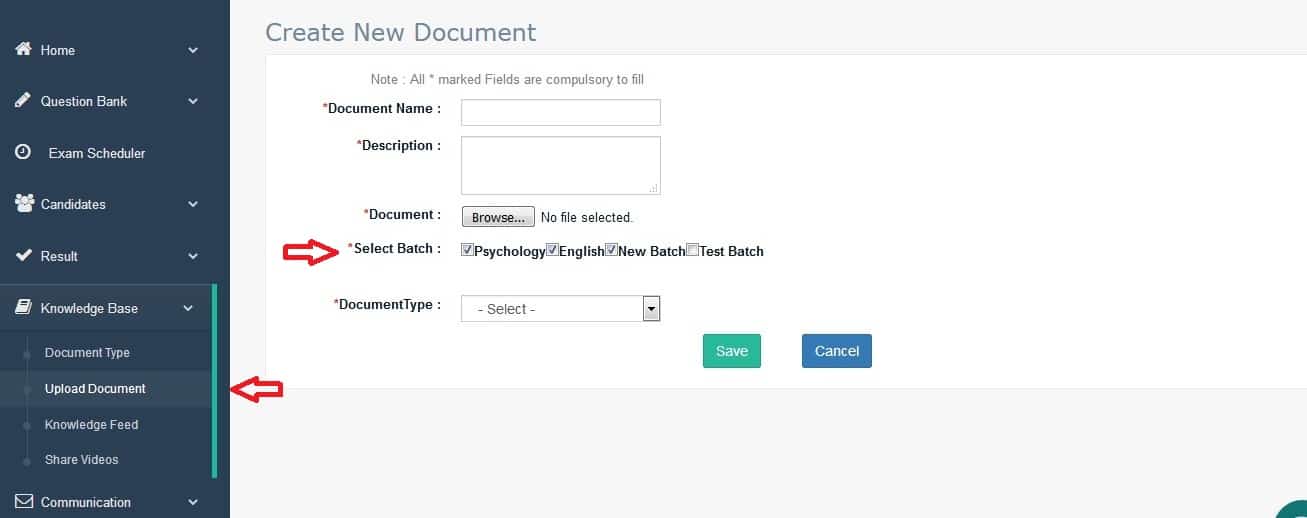
 

Knowledge Management document Upload and share Step

This is useful feature of you want to share  one or more documents like preparation material, exam topic analysis, instructions with group of candidates related to online examination

Categories

Privacy Overview

This website uses cookies so that we can provide you with the best user experience possible. Cookie information is stored in your browser and performs functions such as recognising you when you return to our website and helping our team to understand which sections of the website you find most interesting and useful.